Dear Customer:
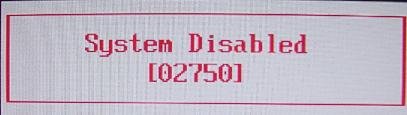
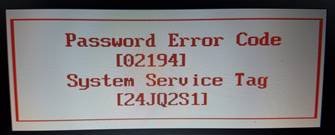
If you have a Dell Laptop Desktop or Tablet showing System Disabled, You can buy your password here, so enter your Dell System Disabled Code below And Dell Model Number and hit buy now, Get your Laptop master password, full support and instructions.
Your password plus instructions will be sent by email within 5 minutes or the most it takes is 2 hours, password will work 100% or your money back.
Contact email is:
Main Problem and Solution on Dell Laptop Tablet and Desktop When Bios or Hard drive Password set:
When you turn on your Dell, it will ask for a password, enter 3 wrong passwords, or just hit the enter key 6 times and it should display the System Disabled code, we will use this code to generate your password.
Disclaimer:
Please Note: We like to think that you are unlocking your own Dell Laptop Desktop or Tablet and that you know how many passwords are set,
Know that Bios Password is used to unlock the motherboard, and hard drive password unlock only hard drives,
Bios & HDD Passwords Are Sold Separately.
Keywords:
dell system disabled password, dell system disabled, unlock dell laptop.